
Quick MQTT Setup via App
In the YLAI App, you can easily configure MQTT server parameters and data item active reporting rules.
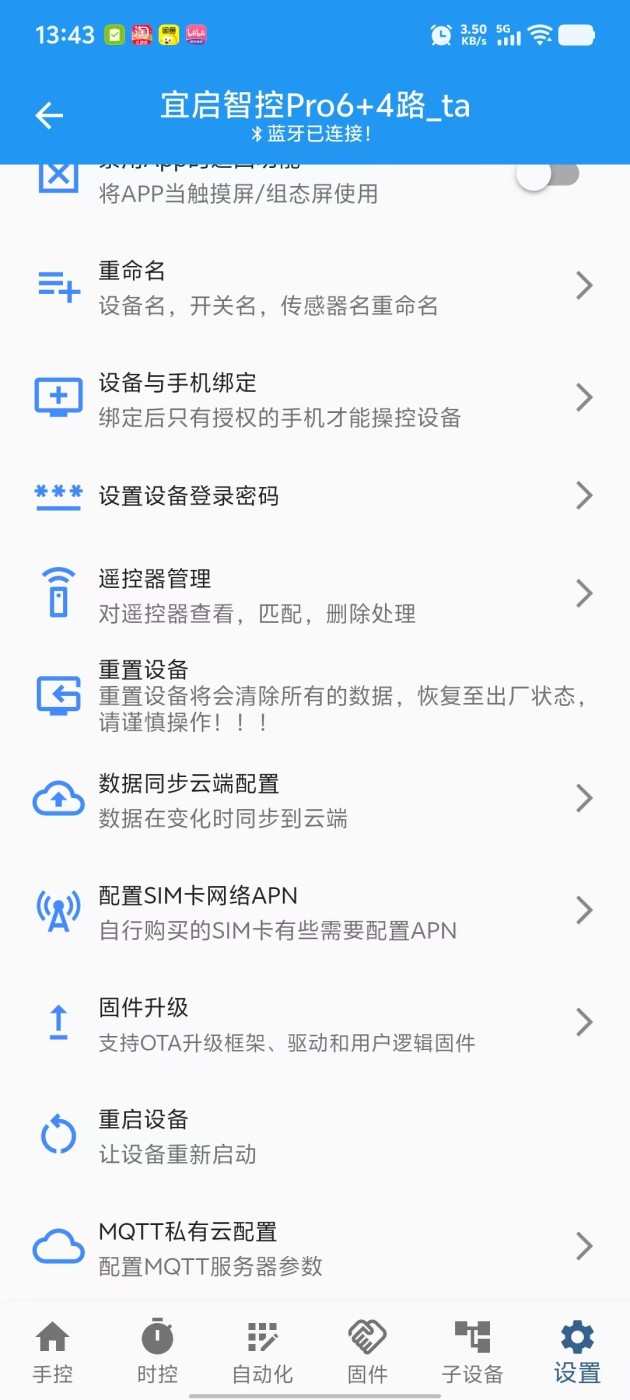
MQTT Configuration Entry
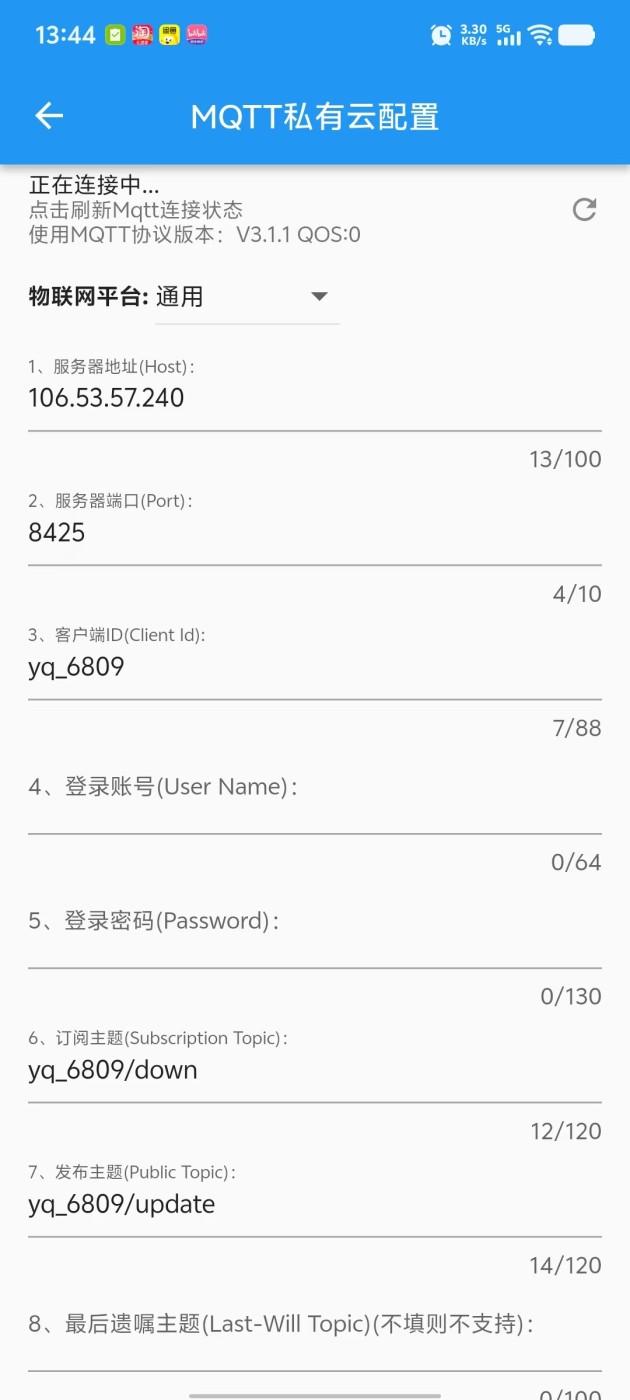
MQTT Configuration Page
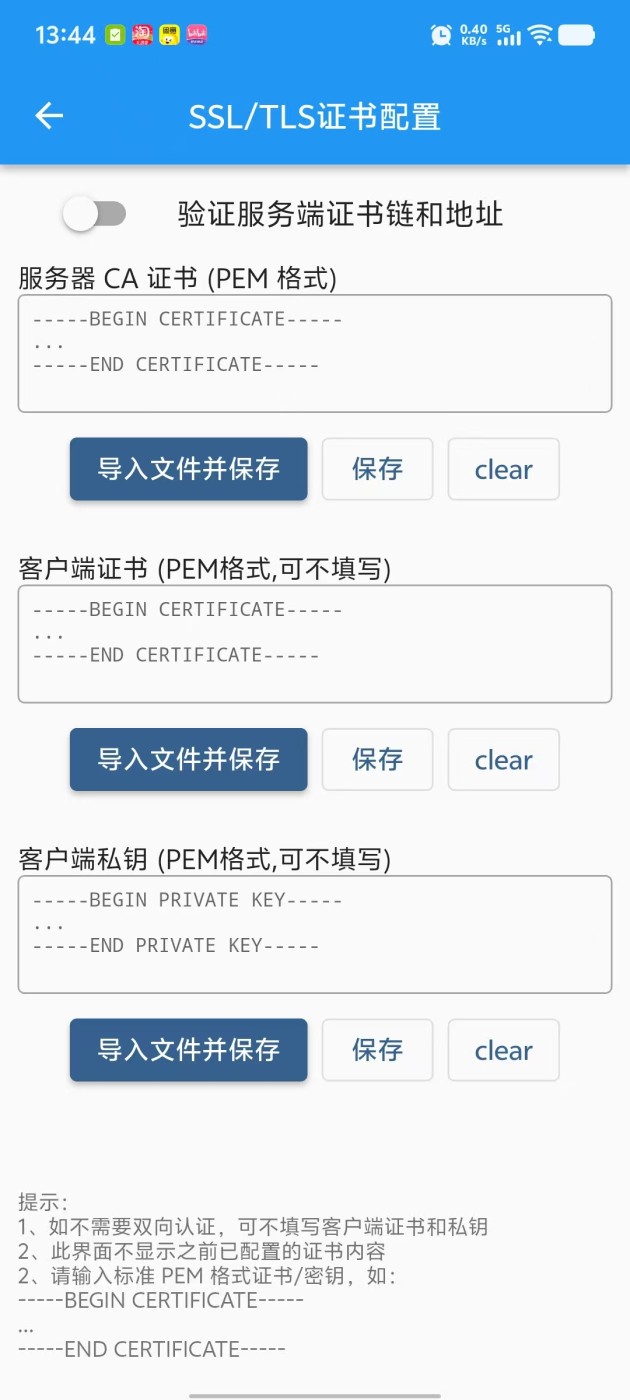
SSL / TLS Certificate Configuration
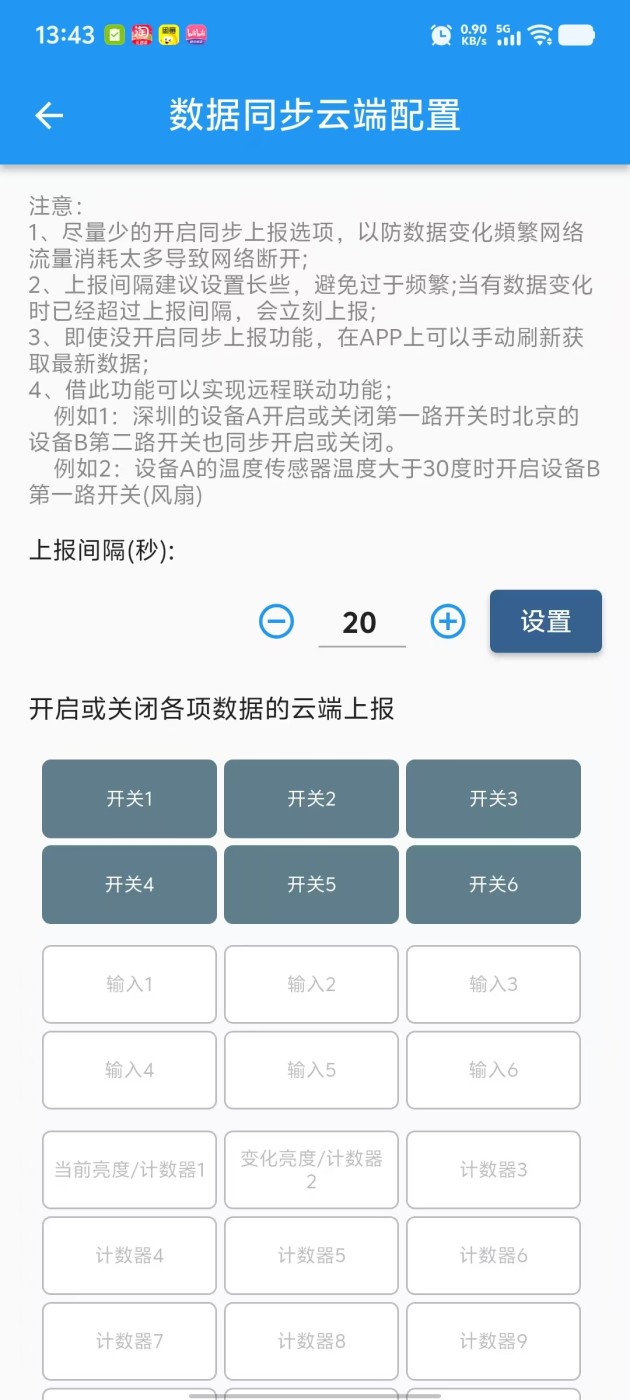
Data Item Active Reporting Rules
Protocol Overview
IOTAutoMate supports standard MQTT protocol, MQTT version: V3.1.1, QoS level: QoS 0, can connect to any MQTT Broker, including:
Data Reporting Format
Device reporting uses JSON format and follows these data synchronization specifications:
Initialization Upon first connection, immediately report full data.
Incremental Update Only when data points change, actively report changed fields.
Customization Reporting logic can be precisely configured via "Data Sync to Cloud" in the App.
{
  "devNameA": [{              // Device name, format: yq_MainId_subId; where yq is a fixed string,
                              // MainId: hexadecimal IOTAutoMate device ID, subId: hexadecimal Mesh sub-device ID; eg: yq_A755_0
    "o": [states, size],      // states: switch states, binary bit represents output state, 0: off, 1: on; size: number of outputs
    "p": [onoffs,inverses,p0,h0,pr0,hr0,...,pN,hN,prN,hrN],
                              // PWM states, onoffs: switch states, binary bit represents output state, 0: off, 1: on;
                              // inverses: duty cycle inversion, binary bit represents output state, 0: normal, 1: inverted;
                              // pN: Nth channel duty cycle (scaled by 100); hN: Nth channel frequency; prN: Nth channel duty cycle ramp rate; hrN: Nth channel frequency ramp rate
    "i": [onoffs,pulse0,hz0,...,pulseN,hzN],
                              // Input states, onoffs: digital input states, binary bit represents output state, 0: inactive, 1: active;
                              // pulseN: Nth channel pulse count; hzN: Nth channel frequency value;
    "t": [t1, t2, humi],      // Environmental data. t1: temperature 1 (DS18B20); t2: temperature 2 (SHT30); humi: humidity (SHT30)
    "a": [a1, a2, a3],        // Analog input mapped values (scaled by 100), a1: analog 1; a2: analog 2; a3: analog 3
    "c": [c1, c2, ..., c16],  // Counter values. 16 Int32 type counter current values
    "r": rfValue,             // Received 433MHz remote signal. High 20 bits are remote ID, low 4 bits are key value
    "s": states,              // Device internal states. bit0: startup, bit1: Bluetooth connected, bit2: Bluetooth disconnected
    "mb": [states, size],     // RS485 read coil/discrete input states, states: binary bit represents state, 0: off, 1: on; size: quantity
    "mv": [v1, v2, ...,valN], // RS485 read holding/input register values, valN: Nth value
    "v": [fVer, uVer, dVer]   // Version numbers. fVer: framework firmware; uVer: user logic; dVer: driver firmware; (only reported on first connection)
  }],
        ...,
    "devNameN":[{...}],
}
Reporting Message Example
{
  "yq_6809_0": [{
    "o": [10, 6],
    "i": [4, 0, 0, 0, 0, 28, 0, 0, 0, 0, 0, 0, 0],
    "c": [500, 500, 0, 0, 0, 0, 0, 398, 0, 0, 0, 0, 0, 0, 0, 0],
    "p": [1, 0, 0, 500, 0, 0, 10000, 500, 0, 0, 10000, 500, 0, 0, 10000, 500, 0, 0],
    "t": [0, 16, 43],
    "a": [115, 0, 0],
    "v": [83, 1767745693, 3],
    "mb": [0, 0],
    "mv": []
  }]
}
Control Commands
Control Data Format (Single Command)
{
  "device": "devName",// devName: device name, example: "yq_6809_0"
  "data": {
    "id": 1,// Message ID, auto-increment
    "method": "",// Control method, example: "so"
    "params": {}// Control parameters, varies by control method
}
Control Data Format (Multiple Commands)
{
  "device": "yq_A755_0",
  "data": [
    { "id": 1, "method": "so", "params": [228, 0] },// Control command 1
    { "id": 2, "method": "sp", "params": [0, 1, 0, 5000, 1000, 0, 0] }// Control command 2
  ]
}
Switch Control (so) Control relay switch output states
"method": "so",// set output
"params": [value0, value1]
    //value0: 0-16 switch control values, value1: reserved, default 0.
    //Each 2 bits in value0's binary value corresponds to 1 output: 00=no action, 01=off, 10=on, 11=toggle
    //Example: value0 = 228 = 0b 11 10 01 00
    //Switch 1: 00 = no action
    //Switch 2: 01 = off
    //Switch 3: 10 = on
    //Switch 4: 11 = toggle
    //Other switches: 00 = no action

    //Example code: Turn on switch 3, other switches no action

{
	"device": "yq_6809_0",
	"data": {
		"id": 1,
		"method": "so",
		"params": [32, 0]
	}
}
PWM Control (sp) Control PWM output duty cycle, frequency and ramp rate
"method": "sp",// set pwm
"params": [idx, onoff, inverse, pwm, hz, pwmRate, hzRate]
    // idx: PWM index (starts from 0)
    // onoff: 0=off, 1=on, 2=toggle
    // inverse: 0=normal, 1=inverted
    // pwm: duty cycle 0-10000 (actual 0-100.00%)
    // hz: frequency 1-150000Hz
    // pwmRate: duty cycle ramp rate 0-10000/s (actual 0-100.00%/s)
    // hzRate: frequency ramp rate 0-100000Hz/s
    // Set to -1 to keep original value

//Example code: Set PWM1 duty cycle to 80%, keep other parameters

{
	"device": "yq_6809_0",
	"data": {
		"id": 1,
		"method": "sp",
		"params": [1, -1, -1, 8000, -1, -1, -1]
	}
}
Counter Control (sc) Set or modify the 16 internal counter values (parameter values)
"method": "sc",// set counter
"params": [idxN,typeN,valueN,...]
    // idx: counter index 0-15
    // type: operation type 0=set, directly set value; 1=increment, increment from current value; 2=decrement, decrement from current value
    // value: specific operation value (Int32)

//Example code: Set counter 3 to 12345, increment counter 4 by 8899

{
	"device": "yq_6809_0",
	"data": {
		"id": 1,
		"method": "sc",
		"params": [2, 0, 12345, 3, 1, 8899]
	}
}
RF433 Remote Control (sr) Send 433MHz RF signals to remotely control receiving devices or simulate remote buttons
"method": "sr",// set RF
"params": [idx, rfValue]
    // idx: remote index
    //0~9: corresponds to hardware preset remotes 1~10
    //10~19: corresponds to device learned remotes 11~19
    //-1: use custom rfValue (high 20 bits ID + low 4 bits key value)
    //rfValue: 433MHz key value (0~15)

//Example code: Press button 3 on remote 3

{
	"device": "yq_6809_0",
	"data": {
		"id": 1,
		"method": "sr",
		"params": [2, 3]
	}
}
Get Full Data (gd) Get all device data
"method": "gd",// get data
"params": dataType
    // dataType: data type to retrieve, reported as full data
    //0: basic data (switches, inputs, PWM, temperature/humidity, ADC, counters, Modbus data)

//Example code: Get basic data

{
	"device": "yq_6809_0",
	"data": {
		"id": 1,
		"method": "gd",
		"params": 0
	}
}
Execute "One-Click" Task (ro)
"method": "ro",// run oneKeyTask
"params": taskId // Task ID (visible in APP)

//Example code: Execute "one-click" task with ID 12

{
	"device": "yq_6809_0",
	"data": {
		"id": 1,
		"method": "ro",
		"params": 12
	}
}
Enable/Disable Automation or Scheduled Task (se)
"method": "se",//set enable
"params": [taskId, enable]  //taskId: task ID to control; enable: 0: disable, 1: enable

//Example code: Disable task with ID 13

{
	"device": "yq_6809_0",
	"data": {
		"id": 1,
		"method": "se",
		"params": [13,0]
	}
}
Stop Executing Delay Task (sd)
"method": "sd",//stop delay
"params": id  // Task ID to stop, no effect if task is not executing

//Example code: Stop task with ID 14

{
	"device": "yq_6809_0",
	"data": {
		"id": 1,
		"method": "sd",
		"params": 14
	}
}
Clear Digital Input Pulse Count (cp)
"method": "cp",//clear pulse
"params": idx  //Digital input index to clear

//Example code: Clear pulse count for input 2

{
	"device": "yq_6809_0",
	"data": {
		"id": 1,
		"method": "cp",
		"params": 1
	}
}
System Commands
Reboot Device (rb)
"method": "rb",//reboot
"params": 1//1: reboot

//Example code: Reboot device

{
	"device": "yq_6809_0",
	"data": {
		"id": 1,
		"method": "rb",
		"params": 1
	}
}
Set/Modify App Device Password (sk)
"method": "sk",//set key
"params": [admin, user]//admin: admin password, user: user password; if either is set to 0, password is cleared

//Example code: Set admin password to 123456, user password to 654321

{
	"device": "yq_6809_0",
	"data": {
		"id": 1,
		"method": "sk",
		"params": [123456, 654321]
	}
}
OTA Remote Upgrade (ot)
⚠️ Proceed with Caution
- Device will automatically reboot after successful upgrade, please assess on-site risks.
- Ensure firmware version is correct and stable to avoid crashes or functional issues.
- During upgrade, network (2.4G WiFi) and power supply must be extremely stable.
- When updating user logic firmware on MQTT version devices, firmware must include MQTT configuration, otherwise connection will be lost.
"method": "ot",//ota
"params": [binType, url, wifiName, wifiPsw]
    // binType: firmware type
    //  "0": Framework firmware (requires version > 82)
    //  "1": User logic firmware (will connect to MQTT in firmware after update)
    //  "2": User logic firmware (permanent)
    //  "3": Driver firmware
    // url: firmware file download direct link
    // wifiName: on-site 2.4G WiFi name
    // wifiPsw: on-site WiFi password

//Example code: Upgrade user logic firmware

{
	"device": "yq_6809_0",
	"data": {
		"id": 1,
		"method": "ot",
		"params": ["1", "http://example.com/firmware.bin", "WiFiName", "WiFiPassword"]
	}
}
After upgrade completion, you can verify the version number
through the device's reported v field to confirm
upgrade success.
Need to integrate with IoT platforms?
View Platform Integration Tutorials →